
This article details how to build a fully automated tech intelligence system using n8n automation, Docker local deployment, Zhipu AI for analysis, and Feishu/Lark bots for notifications. The tutorial ...
Abstract: Do you find yourself opening dozens of web pages every morning, manually sifting through a vast amount of information to find valuable insights? This repetitive and inefficient task is draining your creativity. This article will guide you step-by-step on how to use n8n automation technology, combined with Docker, Zhizhu AI, and Feishu bots, to create a fully automated technology intelligence system. From environment deployment to code configuration, this comprehensive guide ensures a smooth learning experience, with complete code provided at the end. Are you ready to free your hands?

In this era of information overload, our biggest pain point is not "unable to find information," but rather "how to extract signals from the noise."
Imagine your current morning:
1.You open 5-6 websites like 36Kr, Huxiu, Juejin, and Open Source China.
2.You quickly browse through hundreds of headlines, trying to find content related to "AI" and "large models."
3.You copy the links, paste them into a document, and manually write summaries.
4.Then you forward them to your company group or your own knowledge base.
This entire process takes at least 40-60 minutes. Moreover, if you get busy and forget to check, it can lead to serious FOMO (fear of missing out).
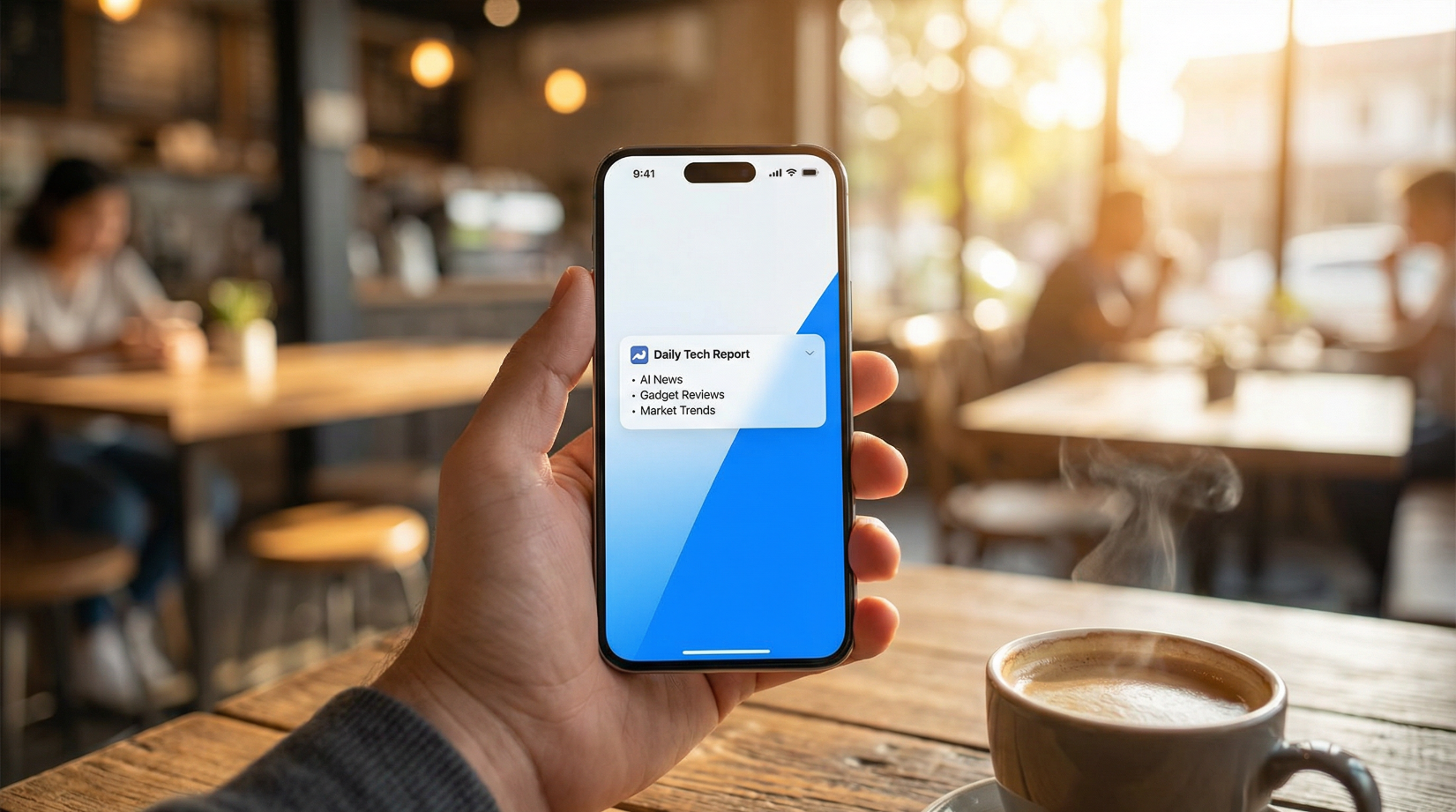
What if there were a more elegant solution? For instance, while you are still asleep, an tireless robot could run through all the websites for you, filtering out the hardcore insights you care about, summarizing them into a concise daily report, and pushing it to your Feishu mobile app at 8 AM sharp.
' fill='%23FFFFFF'%3E%3Crect x='249' y='126' width='1' height='1'%3E%3C/rect%3E%3C/g%3E%3C/g%3E%3C/svg%3E)
Today, we will turn this idea into reality using n8n automation workflows.
To help you better understand the power of this system, let's look at a real user story.
Background: Aqiang is a product manager in the technology industry, responsible for the implementation of AI applications. He must keep up with the latest developments in LLMs (large language models) every day. In the past, he would frantically scroll through news articles before the morning meeting, often getting "interrogated" by the technical director for missing a newly released open-source model.

Solution Process: Aqiang decided he would no longer be a "mover." He used his weekend to deploy an n8n automation system locally.
1.Data Source (Ears): He configured an RSS node to automatically fetch content from mainstream tech media.
2.Filter (Brain): He wrote a simple JavaScript code to instruct the system: "I only care about keywords like 'generative AI,' 'RAG,' and 'DeepSeek'; filter out all other entertainment gossip."
3.Analyst (Mind): He integrated the Zhizhu GLM large model, allowing AI to read long articles and summarize them into "one-sentence key points."
4.Messenger (Mouth): He connected a Feishu bot via Webhook to generate a beautifully formatted card.
Results Display: At 8:00 AM on Monday morning, Aqiang's phone vibrated on time. While drinking coffee, he spent 3 minutes reading the 10 core news articles filtered and summarized by AI. During the subsequent morning meeting, he confidently shared insights about a newly released AI video tool from the previous night, not only avoiding tough questions but also offering unique perspectives.
The value of the tool lies not in the tool itself, but in how it saves you time to think about more important issues. Below is Aqiang's step-by-step guide for setting it up.
There are many n8n tutorials online that vary in quality, with more pitfalls than solutions. This tutorial is based on a Windows environment and uses the most stable Docker deployment method to ensure you can run it successfully in one go. (For specific detailed instructions with images, please see the end of the article.)
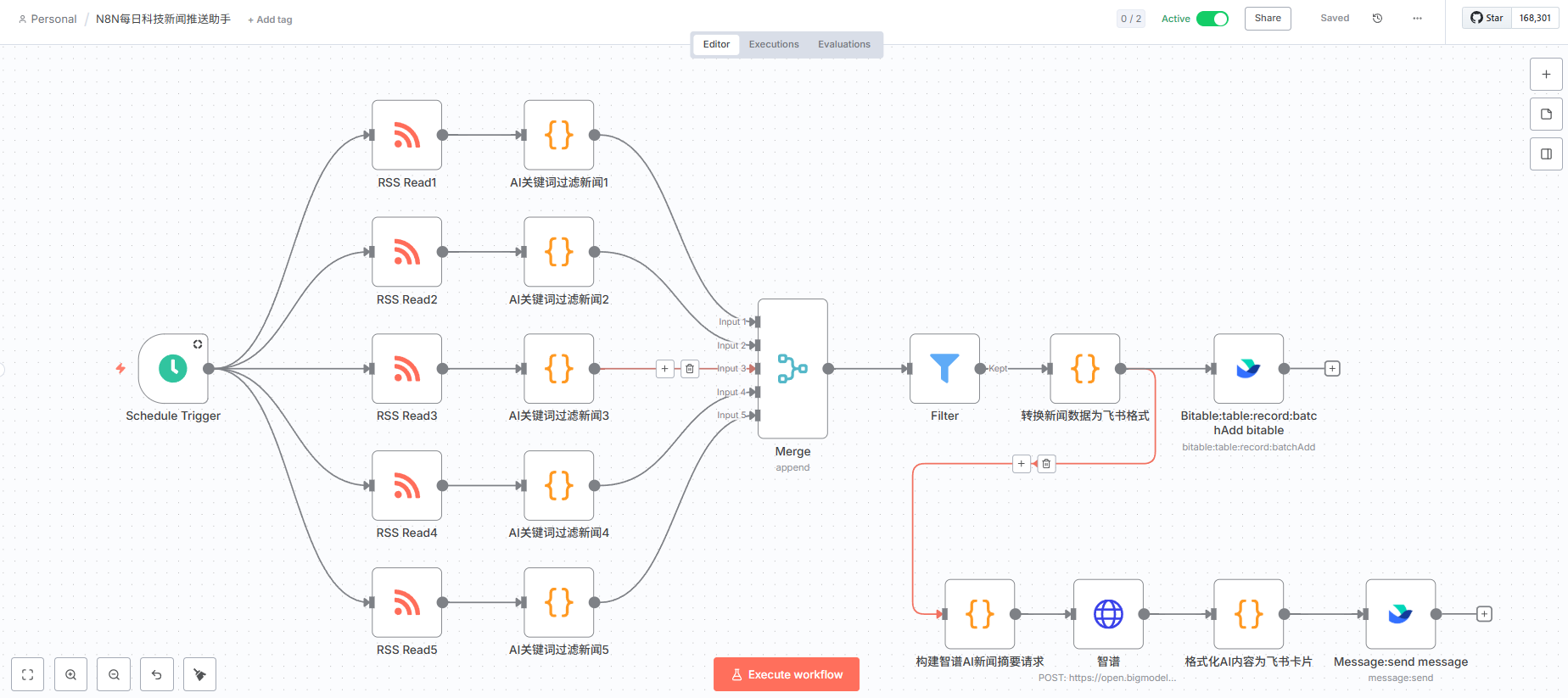
n8n is a node-based workflow automation tool that is safest and free when deployed locally.
1.System Self-Check: Press Win + R and enter winver. If you are using Windows Home Edition, it is recommended to upgrade to Professional Edition or manually enable Hyper-V.
2.Enable Virtualization: In "Turn Windows features on or off," check Hyper-V and Virtual Machine Platform, then restart your computer.
3.Install Docker: Go to the Docker official website to download and install it.
Pitfall Guide: Registration and pulling images may be hindered due to network issues, so it is recommended to configure domestic image sources (such as Alibaba Cloud, NetEase, etc.).
Change Source Operation: In the Docker Engine settings, paste the following configuration and restart Docker:
4.Start n8n: Open the CMD command line and enter the following command to pull and start n8n:
docker volume create n8n_data
docker run -it --rm --name n8n -p 5678:5678 -v n8n_data:/home/node/.n8n docker.n8n.io/n8nio/n8n
Once successful, access http://localhost:5678 in your browser, register an account, and you will enter the n8n interface.
Since this is a daily report, it needs to be on time.
Search Node: Schedule
Settings: Set Trigger Interval to Days and the time to 8 (8 AM).
This is our "listening ear."
Search Node: RSS Read
Enter URL: It is recommended to aggregate multiple sources.
36Kr: https://www.36kr.com/feed
Huxiu: https://www.huxiu.com/rss/0.xml
Juejin: https://juejin.cn/rss
Titan Media: https://www.tmtpost.com/rss.xml
Open Source China: https://www.oschina.net/news/rss
The content from RSS is too mixed; we need to use code for keyword filtering.
Search Node: Code
Copy the code (paste the code from the document at the end into this section to filter for AI/technology or any relevant keywords you want to include).
This is the "brain" of the workflow. We use the excellent domestic Zhipu GLM model (the API is affordable and powerful).
Preparation: Register on the Zhipu AI Open Platform to obtain an API Key.
Constructing the Request: First, use a Code node to build the Prompt, telling the AI: "You are a tech editor; please select the 10 most important news items from the input data and generate a daily report in Markdown format."
Sending the Request: Use the HTTP Request node.
Method: POST
URL: https://open.bigmodel.cn/api/paas/v4/chat/completions
Header: Authorization: Bearer your API Key
Body: Reference the JSON constructed in the previous step.
The final step is to send the content generated by the AI to your phone.
Feishu Developer Backend: Create a corporate self-built application to obtain the App ID and App Secret.
Enable Permissions: Activate the "Bot" capability.
Configure n8n:
Use a Code node to encapsulate the AI's Markdown response into the Feishu card format (JSON).
Use the Message: send message node (you need to install the community plugin n8n-nodes-feishu-lite or directly use the HTTP Request to call the Feishu Webhook).
Pitfall: When obtaining the Chat ID, the fastest way is to use the Feishu API Debugging Console.
During the entire process of setting up the n8n automation, I summarized its key advantages and disadvantages for your reference:
| Dimension | Pros | Cons |
| Cost | Extremely low cost for local Docker deployment is free, and the Zhipu API offers a daily free quota or very low rates. | You need a computer to keep Docker running, or you can purchase a cloud server (VPS). |
| Privacy | Data is completely privatized; all processes run locally, so there is no need to worry about sensitive company data being leaked to third-party platforms. | Compared to cloud-based SaaS like Zapier, there is no ready-made cloud environment, and you need to maintain it yourself. |
| Flexibility | Unlimited expansion supports over 1,000 applications, allowing not only for daily news reports but also for competitor monitoring, automated replies, and more. | The learning curve is slightly steep. Although it is low-code, some understanding of JavaScript and JSON is still required when dealing with complex logic. |

Knowledge workers/researchers: Need a lot of input but don't want to be overwhelmed by junk information.
Operations/product managers: Need to monitor competitor dynamics and industry trends.
Tech enthusiasts: Enjoy tinkering with tools and pursue maximum efficiency.
Don't be intimidated by Docker or code. You can start with a simple RSS -> Feishu integration, and once you have that running, you can add Filter and AI nodes.
Once you set up this "digital employee," it will be your most loyal partner. It doesn't sleep, doesn't complain, and only provides you with the most valuable intelligence.
Trend Prediction: Future workplace competitiveness will not depend on how much knowledge you have, but on how many AI agents you can use to work for you. Mastering n8n means mastering the baton to command an army of AIs.
Just watching tutorials without hands-on practice will never help you learn. But to help you avoid detours and save you from tedious debugging, I have packaged the complete project files similar to A Qiang's.
https://my.feishu.cn/wiki/GNaewrzNTiGN1okZr00coTJinGn
Complete JSON template for n8n workflows: Download it and import it with one click, no need to write a single line of code. Just modify the API Key and replace the Feishu-related configurations and permissions to run it directly!
Super detailed setup manual: Includes Docker configuration details and common error solutions that were not elaborated in the text.
Don't let "do it later" turn into "never do it." Go get it now, and by 8 AM tomorrow, let your AI intelligence officer be ready on time!
If you had a 24/7 AI robot on standby, which tedious and repetitive task would you most want to hand over to it? Maybe I'll create a beginner-friendly tutorial to share and learn with everyone next time?
A. Organizing meeting minutes
B. Responding to repetitive customer inquiries
C. Collecting competitor price changes
D. Other (please share your ideas in the comments!)
Comprehensive guide to Claude Skills feature - learn how to transform AI from a one-time conversation tool into a sustainable professional collaborator through workflow engineering, complete with real...
Shares Productivity Tools
This article uses a real-world case study of creating a promotional video for a coffee shop to walk you through how to leverage the latest AI video generation tools (such as Sora2 and Lovart) to craft...
More in this section
This article provides an in-depth review of Google's latest Gemini 2.5 Flash Image model. Through over 30 real-world test cases, it demonstrates the model's revolutionary ability to solve the subject ...
More in this section
This article shares the author's practical experience of developing an MCP service at zero cost and successfully monetizing it for 1,000 yuan in just five days of spare time, using AI tools such as Co...
More in this section

Loading comments…